Scanners – Reviews & Tests
© Thomas GadeDesktop Film Scanners (Line Sensors)
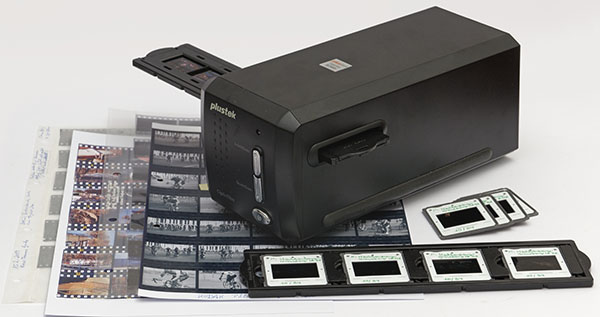
Traditional desktop film scanners contain line sensors with a macro lens and a mechanism that enables line-by-line scanning of the originals. Such scanners offer medium to very high resolutions. Due to the motorized scanning process they are relatively slow and produce noticeable noise.
Nikon
Nikon LS-2000Nikon LS-4000
Nikon Coolscan 5000 ED
Nikon SA-21 – Modification for long film strips
Microtek
Microtek ArtixScan120tf (identical with: Polaroid Sprintscan 120)Polaroid
Polaroid Sprintscan 45Polaroid Sprintscan 35 Plus
Plustek
Plustek OpticFilm 7200iPlustek OpticFilm 135i
Plustek OpticFilm 7500i
Plustek OpticFilm 8200i
Plustek OpticFilm 120
Reflecta
reflecta Proscan 3600reflecta Proscan 4000
reflecta DigitDia 3600
reflecta RPS 10M
CMOS Scanners
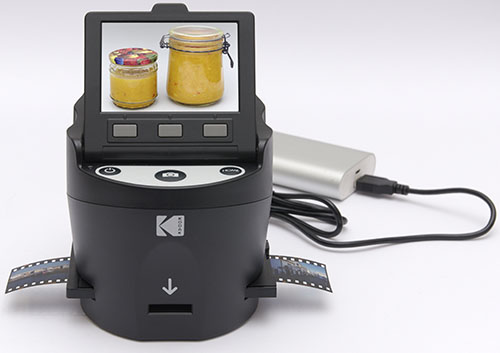
CMOS scanners are essentially special digital cameras that save images to SD cards. No computer is needed for operation – control is done with buttons on the device. It couldn’t be simpler. The devices are cheap. Unfortunately, scan quality is rather poor. The resolution is far below that of line sensors.
Kodak
Kodak ScanzaRollei PDF-S 330 Pro
Rollei
Rollei DF-S 290 HDFlatbed Scanners with Transparency Unit
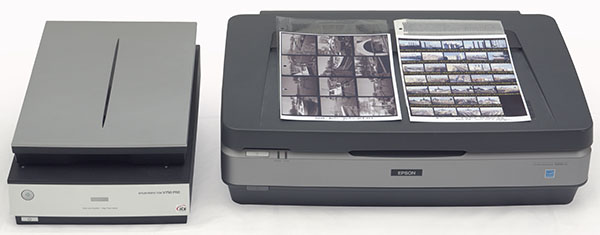
Flatbed scanners with transparency units are advantageous when a mix of differently sized slides and negatives needs to be scanned. They can also be used to digitize reflective originals.
Ideal for medium format and sheet film, rather weak for 35 mm film and smaller formats.
For sheet film and medium format (6x4.5 and larger) the resolution of many flatbed scanners is sufficient even for demanding users. However, many perform weakly with 24x36 mm originals and even smaller formats. Here, exaggerated DPI values promise more than the flatbed scanners can actually deliver. The lack of an autofocus system, which ensures the necessary optimal sharpness at the highest DPI settings, is problematic. Despite their weaknesses, better flatbed scanners with transparency units are good tools for scanning films and prints.
Agfa
Agfa Arcus 1200 (identical to: Umax AlphaVista II)Agfa Snapscan 1236s
Agfa F40
Canon
Canon CanoScan 8400FCanon CanoScan 9950F
Others
Linotype / Heidelberg Ultra Saphir IIMicrotek Scanmaker i900
Epson
Epson Expression 1600Epson Expression 1680
Epson Perfection 3200 Photo
Epson Perfection 1640SU
Epson Perfection 4990 Photo
Epson Perfection 2450 Photo
Epson Perfection V750 Pro
Epson Expression 10000XL
See also: Depth of Field Comparison – Flatbed Scanners
Document Scanners
Fujitsu S510 and fi-6130Comparison of the maximum resolution of various scanners
How well do scanners resolve details? Manufacturers often boast with high dpi values that raise exaggerated expectations. For comparison we use a USAF 1951 test slide with ever smaller bar charts as well as a color negative in 35 mm format.
Determining resolution using a USAF 1951 Resolving Power Test Target.
Basic Information on Film Scanners
There are special film scanners designed only for scanning films in certain sizes. Especially for 35 mm films (24x36 mm) there is a relatively large selection.For all formats, flatbed scanners with transparency units offer significantly greater flexibility. The original is placed on a glass plate under which a movable scanner head is located. Reflective originals reflect light coming from below. Transparent originals are illuminated from above. Epson scanners are particularly recommended for home use, photo studios or small archives. Until around 2005 the selection was considerably larger and some old devices from e.g. Agfa or Heidelberg are still in use today.
The drawback of flatbed scanners is usually the lack of autofocus, which means that the best possible sharpness or resolution is not achieved or is only achieved through tedious experiments to determine the correct distance of the original from the platen glass. The latter is also a source of errors due to dirt or a gradually forming coating on the underside, which requires opening the scanner for cleaning.
In the professional sector, large drum scanners were used that enabled very good scans with high sharpness and very good tonal gradation.
In the scanners, sensors measure the light coming from the original image in order to convert it into digital information. CCD sensors (Charge-coupled Device) are most commonly used. In addition, lenses and mirrors are used to achieve optimum image reproduction. CIS sensors (Contact Image Sensor) manage without special optics. PM sensors (Photomultiplier Tubes) are used in drum scanners and deliver the best results.
Photographing instead of scanning

Alternatively, films are photographed with digital cameras and good macro lenses. This method delivers very good results. With the right technique it is faster than conventional scanning. However, infrared-supported defect detection is only feasible with deeper knowledge and higher technical effort. However, diffuse light sources significantly reduce the visibility of scratches and dust, so that the subsequent retouching effort is usually small.
See also: Automatically photographing slides in magazines
Unfortunately, when digital cameras were invented, an important purpose was overlooked, namely photographing negatives. Their inverted tonal values must be inverted. In the case of color images, a white balance must also be performed, which is difficult due to the orange/brownish coloration of the carrier material (masking).
However, the necessary software has long been included in good scanning programs, so the lack of this editing option in camera software is not entirely understandable. At least not in mid- to high-priced cameras.
We show how to do this with image editing and RAW converters.
File Formats and Bit Depth
Bit Depth – The more bits, the betterScanners divide the brightness spectrum of the image into finely graduated tonal values. 24-bit color depth (equal to 8 bits per channel) results in a maximum of 256 brightness levels per color channel. 48-bit files (equal to 16 bits per channel) already result in 65,536 brightness levels.
The finer a scanner differentiates the tonal values, the better the image quality becomes. For text, 24 bits are far more than necessary. For photos whose brightness and contrast do not need to be strongly edited, 24 bits are sufficient. If you have originals that require drastic tonal corrections, 48-bit files are better. Scanners can have internal 24-bit, 30-bit, 36-bit or other values. The more bits, the better. To obtain files with values above 24 bits, a 48-bit output is necessary because our file systems cannot store 30-bit or 36-bit files.
JPG files contain only max. 8 bits color depth per channel. TIF allows both 8 and 16 bits as well as more than three channels. It is best to create TIF files with 16 bits per channel when scanning. In the subsequent image editing, the usual basic corrections are made, such as improving tonal values, retouching, correcting converging lines, straightening the horizon, etc. The result may then be converted to the space-saving JPG format with moderate compression.
Resolution
Resolution is defined by the number of pixels per inch. In order to achieve high resolution, the optics and mechanics must be right. Many flatbed scanners are advertised with greatly exaggerated dpi values. Only the optical resolution counts, not the interpolated one. Depending on the original, different resolutions are recommended: Text: 300 dpi / Photos: 600 dpi / 35 mm slides and negatives: at least 2000 dpi, preferably 2700 to 4000 dpi.
Connection
Old professional scanners had SCSI connections and later FireWire. Since about 2003 almost all scanners are connected to computers via USB. Modern desktop PCs no longer have FireWire and SCSI connections, but the sockets can be retrofitted using PCI cards.
Adapters that offer FireWire or SCSI on one side and USB on the other are not recommended. They often do not work. On Amazon you can read many negative reviews about such products. However, many cost less than ten euros, so not much money is wasted.
On the second-hand market there are some rare adapters with cables from Ratoc, Adaptec, I-O Data and Logitec. They are older types that were available between 2000 and 2010 and are now sold expensively second-hand.
Overall, this market is opaque. In some combinations such adapters fulfill their purpose, but there are no sources that make statements about which SCSI and FireWire adapters to USB work for certain scanners.
Scanning Software
Many scanners were / are supplied with their own scanning software. Alternatively, there are the programs:SilverFast Ai and VueScan.
Author’s Note (Supplement 2020):
I have worked with all the devices listed and still use some of them. For 18 years I led projects in which employees digitized images for archives and museums. They were job creation measures with a low budget for technology. Therefore we had to get the best out of affordable scanners. The universal and very inexpensive software VueScan was suitable for all and was used by us because on the one hand it was good (is) and on the other hand only one scanning program had to be taught in the training courses for new employees.
Through this work I got to know most scanners very well and can judge whether they are up to daily use over a longer period or where their weak points are.
My articles reflect my own experiences and tests. They are not copies of manufacturers’ press releases. Some texts are already quite old. Therefore one can assume that the presented technology has long since become obsolete. After years this is certainly the case, but even the Agfa SnapScan 1236s, which was introduced in 1998, is still usable if it is well preserved. However, it is connected via SCSI, which nowadays many potential users can no longer manage due to the lack of suitable connections or the know-how.
© Thomas Gade | photoinfos.com | ISSN 3054-4769 (Online). All texts and images are copyrighted. Any use requires written permission and is subject to a fee.