Converting Negatives to Positive Images
2015 / 2022 © Thomas Gade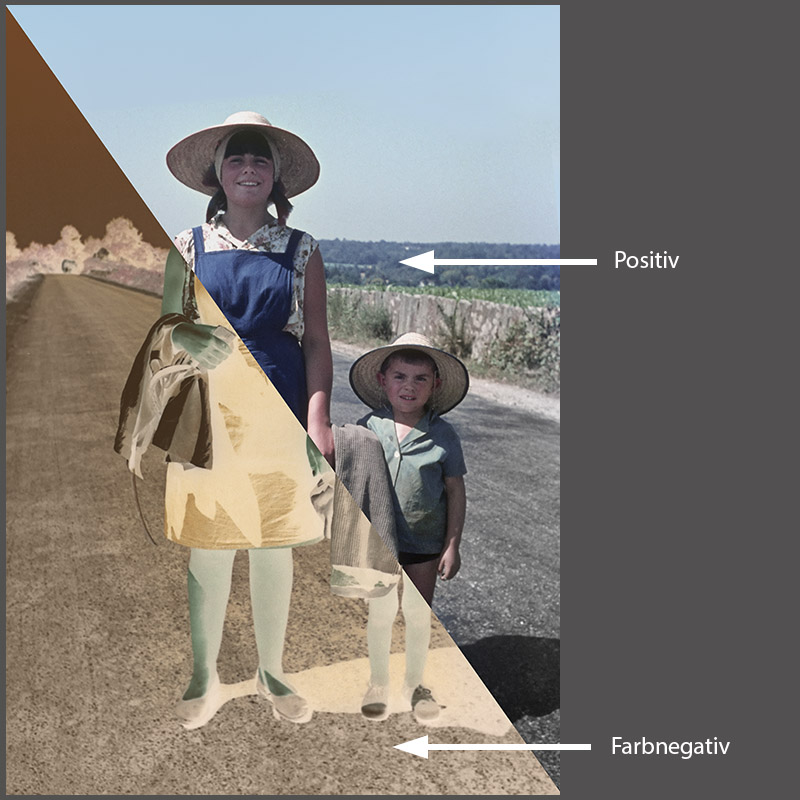
- Index: From Negative to Positive
- ACDSee
- Adobe Lightroom
- Adobe Photoshop
- SilverFast
- SmartConvert
Analog film plays only a minor role as a capture medium today. However, countless negatives from past decades still exist, and many photographers would like to digitize them. One option is to use a dedicated film scanner, but scanning can be relatively slow. An increasingly popular alternative is to photograph slides and negatives with a digital camera and a macro lens. With good equipment and proper technique, the results can be every bit as good as those produced by a traditional film scanner.
Negatives present a unique challenge because their tonal values are reversed. Areas that appear bright in the original scene are dark on the negative, while shadows appear light. The same principle applies to color.
From Negative to Positive – Different Methods
This section introduces several approaches to converting digital photographs of negatives into positive images. Other methods are available as well, but they generally follow the same basic principles.Black-and-white negatives are relatively easy to process because there are no color channels to correct. In many cases, simply inverting the tonal values and adjusting the black and white points in the histogram or the Curves tool produces a surprisingly good result. However, scratches on the film may appear as very bright areas in the negative or as dark streaks in the positive image. Likewise, film borders outside the actual image area can contain tonal values that interfere with the adjustment process. With a little experience, it becomes much easier to recognize these situations and place the black and white points correctly.
Color Negatives
Simply Inverting the Image Is Not EnoughConverting color negatives is considerably more challenging because the colors in the final image must look natural. Current RAW converters cannot accurately interpret photographed color negatives on their own. Unfortunately, simply inverting the image does not produce a correct result.
The reason is that color negative film was designed for a chemical printing process, not for digital scanning. High-quality film scanning software compensates for the characteristics of color negative film, but RAW converters and digital cameras generally do not. Although negative and positive colors are theoretically related, the dyes in color negative film do not reproduce them in a perfectly predictable way. In addition, the dyes fade at different rates over time, depending on the color layer. Color negative film also includes an orange, reddish, or brownish mask that must be compensated for during conversion.
Curves and the Histogram
The two most important tools for this work are the Curves adjustment and the histogram. To understand the conversion methods presented here, you should be familiar with both. It is also important to understand what the white point and black point are and how to position them correctly using the histogram and Curves.
Together, these tools provide the primary controls for tonal inversion, color correction, contrast, and brightness. Every capable image editor and RAW converter includes comparable tools, although their appearance and operation vary from one program to another. Better applications also allow you to copy successful settings from one image and apply them to other images, making batch processing much more efficient.
If you are not yet familiar with these concepts, the following articles provide a good introduction:
Curves
Histogram (Tone Curve)
Black-and-White Negatives

Black-and-white negatives are much easier to process because there are no color channels to correct. As a result, they can be edited easily in RAW converters and Adobe Photoshop. The first step is to invert the tonal values. After that, adjust the brightness and contrast to achieve the desired result. In essence, this is all that is required to convert a black-and-white negative into a positive image.
Index – Developing Black-and-White Negatives:
Black-and-White Negatives
Update (2021):
The articles linked above were written several years ago, but the information is still valid. The basic workflow has remained essentially unchanged. What is still missing is a RAW converter with a high-quality tool specifically designed for converting photographed color negatives. It is surprising that no major software developer has integrated such a feature, especially since dedicated film scanning software has been able to produce accurate color conversions for many years. The underlying technology already exists and would not have to be developed from scratch.