Adobe Photoshop – Converting Color Negatives into Positive Images
2022 © Thomas GadeIndex: From Negative to Positive
Is Photoshop CS2 too old?
No, not at all. Although this software was released in 2005, it already contains everything we need for this task. Several years ago, Adobe published activation keys for the CS2 software suite on the Internet, and the programs can still be found online for download. See the information at the bottom of this page.Adobe's image editing programs include both the Tone Curve and Histogram tools. In Photoshop, it is worth becoming familiar with layers and batch processing. The editing steps required for a digital negative can be recorded as an Action and then applied to all images in a folder—for example, all negatives from a single roll of film. This can be done automatically with Batch Processing or by opening individual images and running the recorded Action.
Since the corrections made for the first image may be too strong for subsequent images—potentially causing clipping at the beginning and end of the tonal range—the first step is simply to invert the Tone Curve by moving the lower-left endpoint to the upper-left corner and the upper-right endpoint to the lower-right corner. At this stage, the endpoints are not yet moved to the beginning and end of the Histogram, so no tonal information is lost.
A duplicate of this result is then created as a new layer, and the remaining recorded Action steps are applied to this duplicate. If the result is satisfactory, the lower layer can be deleted. If highlights or shadows have lost detail because of clipped tonal values, the missing information can easily be recovered from the original layer. In other words, nothing is permanently lost.
In principle, this workflow is quite straightforward, provided you are familiar with the Histogram, the Tone Curve, layers, and Photoshop Actions. Photoshop has supported all of these features for many years. Even the old CS2 version, which can still be found online, is fully capable of performing this task.
Convert RAW Files to TIFF First
For this software classic, the RAW files should first be converted into 16-bit (48-bit color) TIFF files using any RAW converter, without applying significant image adjustments. Photoshop CS2 can open these files without difficulty.
Photoshop CS2 displays the image as a negative. To invert it, either open the Tone Curve and reverse the diagonal line or simply use the keyboard shortcut Ctrl + I.
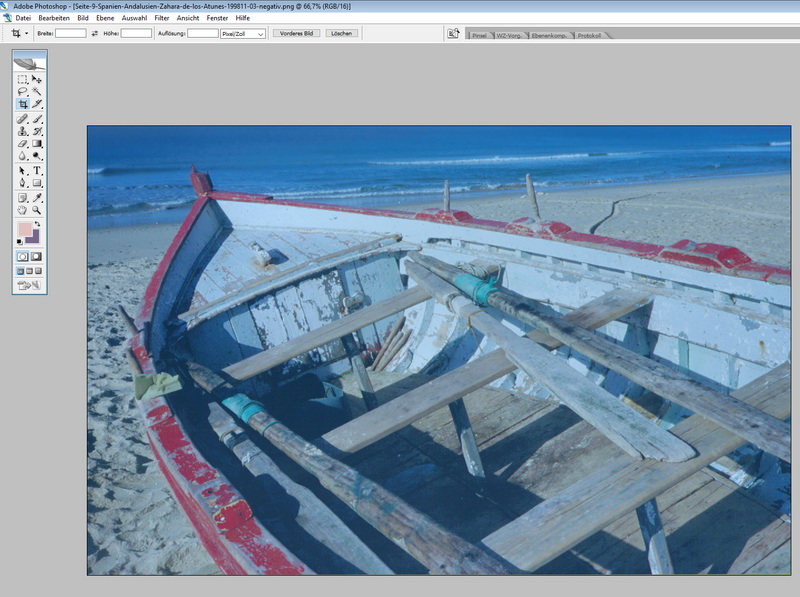
The result is a weak-looking positive image with a pronounced color cast.
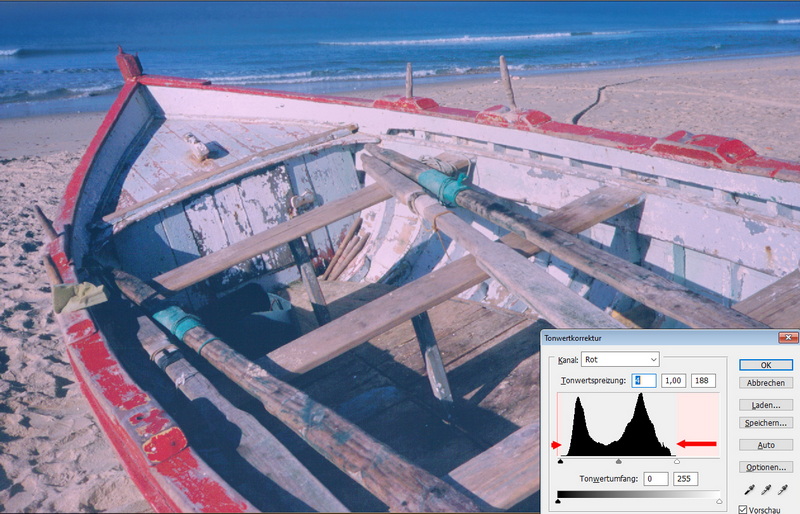
In this older Photoshop version, the Histogram is not displayed inside the Tone Curve dialog. Instead, open the Levels tool (Ctrl + L). Here you can display the Histogram for each of the three color channels individually. Move the black point slider on the left to the beginning of the Histogram and the white point slider on the right to the end of the Histogram.
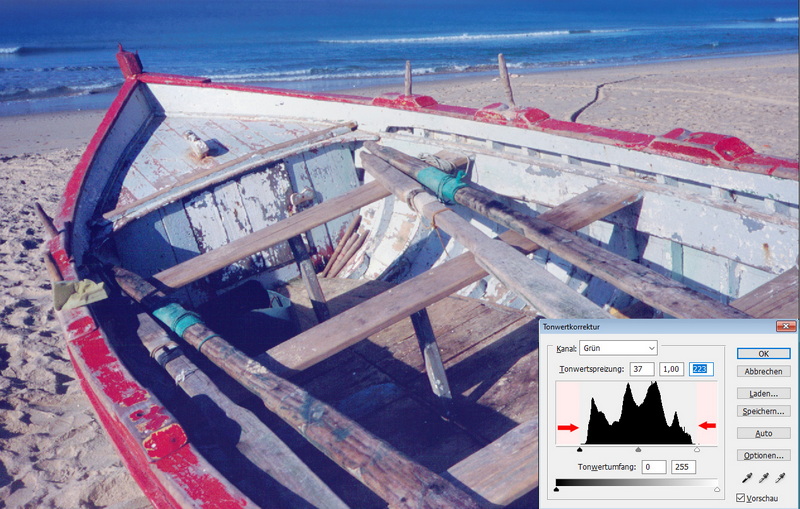
Repeat the same correction for the Green channel.
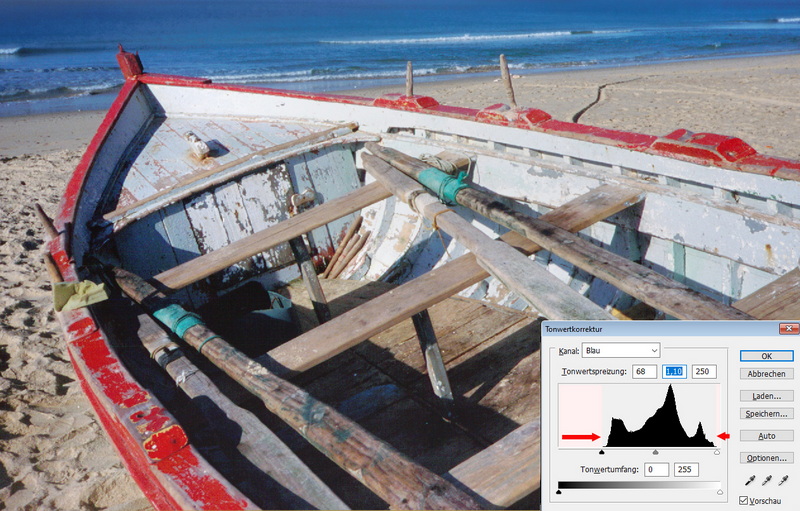
Finally, adjust the black and white points in the Blue channel in the same way by moving them to the beginning and end of the Histogram. The image should now display correctly.
Still Valid Today
This workflow works just as well with the latest versions of Adobe Photoshop. The keyboard shortcuts have remained unchanged. In newer releases, however, you can work directly with the Tone Curve, which displays the Histogram more conveniently than the old Levels dialog. In practice, this makes little difference.
Getting Adobe Photoshop CS2
Photoshop CS2 was released in 2005. While that is a long time in software development, the program still offers nearly everything expected from a capable image editor. Several years ago, Adobe published serial numbers and download links for the CS2 software after shutting down the activation servers required during installation. After the media praised this as a free giveaway, Adobe clarified a few days later that the download was intended only for customers who had originally purchased a CS2 license. Whether this restriction can still be verified today—either by users or by Adobe—and whether Adobe's later clarification has any legal significance remains a matter of debate. Photoshop CS2 can still be downloaded from WinFuture, where the required activation key is also available.https://winfuture.de/downloadvorschalt,3166.html
CS2 activation keys from a former Adobe web page:
https://archive.ph/255q5
- Index: From Negative to Positive
- ACDSee
- Adobe Lightroom
- Adobe Photoshop
- SilverFast
- SmartConvert