Scanning Color Slides with VueScan
Thomas GadeIndex
In theory, processing color slides is straightforward. A good scanner delivers correctly exposed images exactly as they appear on the slide. Therefore, investing time in IT8 calibration using a target is recommended to consistently prevent tonal deviations caused by the scanning process.
The automatic white balance of the scanning software usually counteracts minor color casts in older slides effortlessly. However, caution is advised. Reddish shots of a sunset rely on this specific lighting mood. A digital white balance would incorrectly attempt to correct the image to a neutral daylight character.
VueScan offers versatile adjustment options for faded originals, severe color casts, and specific adjustments to brightness and contrast. For such heavily degraded originals, however, you should expect to perform manual post-processing in an image editing program afterward.
Mounted Slides
Slide mounts are divided into variants with glass panes and glassless models. Glass mounts keep the film perfectly flat. However, they carry risks. Trapped moisture, Newton rings, cloudiness, or dust deposits can visibly degrade the scan results. Hardware-based infrared cleaning can reduce such defects by automatically detecting and retouching dust and scratches, but it cannot eliminate them entirely. Furthermore, glass mounts are heavy. While barely noticeable for a single slide, this quickly adds up to an enormous weight for full slide magazines.Anyone digitizing large quantities of slides that are usually several decades old should use this project as an opportunity to restructure their long-term archiving. Since classic slide shows using a projector rarely take place anymore, the collection can be stored much more space-savingly after scanning than in bulky magazines.
Remounting Glassless
In general, it is recommended to remount originals from glass-covered 5x5 cm mounts into glassless mounts before scanning. For extensive archives, however, this proves to be a time-consuming and tedious step. You should therefore preview all slides on a screen or with a slide viewer beforehand to sort out unusable shots directly.


For a long time, mounting slides between two glass panes secured at the edges with self-adhesive paper strips was popular. Due to their sharp corners and material thickness, these constructions frequently cause mechanical jams in the automatic slide changers of film scanners or projectors.
Equally problematic are extremely thin cardboard mounts, such as those frequently used for Kodachrome slides. They crop the motif more than necessary due to a narrow frame opening and rounded corners. In addition, these cardboard carriers are often deformed or damaged over the years due to damp or improper storage.


Systematic remounting takes a lot of time and new slide mounts have become quite expensive.

Uncut slide films are easy to process. As film strips with up to six exposures in 24 x 36 mm format, they fit perfectly into the standard film holders of flatbed scanners with transparency units. If you are using a dedicated film scanner like the Nikon Coolscan 4000 or 5000, which digitizes the entire uncut film fully automatically frame by frame, you should definitely use this workflow before the film is cut into individual frames for mounting or into short strips.
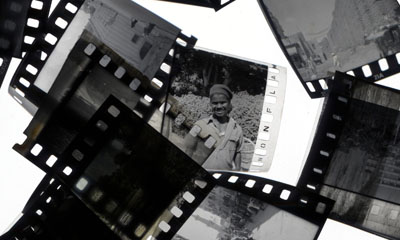
Occasional rare finds occur: Sometimes estates contain slides on classic black-and-white film that were subsequently hand-colored. These are not color films!
Dmax
When digitizing slides, scanners must demonstrate what they can achieve. This is because the dynamic range between maximum highlights and the deepest black is significantly larger than with color negatives. To capture details in the dark shadow areas with fine differentiation, the scanner requires a high real maximum density (Dmax of over 3.6). In the past, manufacturers often cheated in their data sheets by stating purely theoretical values that are unreachable in practice.Recommended Settings in the 'Filter' and 'Color' Tabs
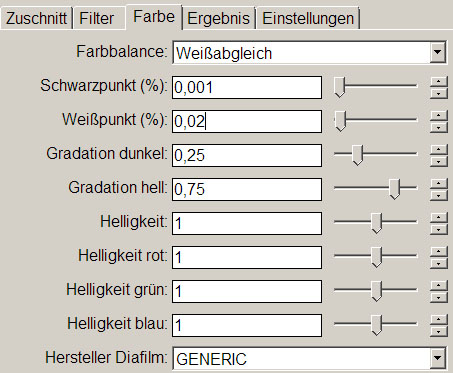
Filter
| Infrared clean | Light * |
| Restore colors | trial and error / test it |
| Restore fading | often useful |
Color
| Black point | 0 or 0.001 |
| White point | 0.02 or smaller ** |
| Slide vendor | GENERIC |
*
1. Exception: Kodachrome films (slides)
The hardware-based dust correction method does not work with this specific film type on every scanner. Advance testing is required.
2. Exception: Slides on conventional black-and-white film
**
Do not leave this value at the default setting of '1'. Otherwise, fine detail in bright image areas (highlights) will be irretrievably lost.
Table of Contents:
General
IntroductionCalibration
Scanning black-and-white film
Scanning color negatives
Scanning slides
Identifying film types
Tabs
SourceCrop
Filter
Color
Output
Settings