Computer – Historical Development
Performance and Price Development Between 1998 and 2023
2014 / 2020 / 2023 © Thomas GadeThis website does not examine computers from the perspective of high-end gamers, but rather with regard to their suitability for digital image editing and for controlling film scanners. By 2003, the development of desktop film scanners had largely reached maturity. That year, the Nikon Coolscan 5000 ED was introduced and has since earned a reputation as the finest scanner for 35 mm film. To this day, it remains the benchmark in this field. Only a few Minolta scanners delivered higher resolution, but they lacked the accessories needed for scanning stacks of slides or long film strips.
The detail resolution of new desktop film scanners was not improved until around 2020, when a few models from Plustek and Pacific Image Electronics slightly surpassed the Nikon level. Apart from that, little changed. The only major advances occurred in PC technology. The bottlenecks that once severely slowed scanning and the processing of large numbers of images have long since disappeared.

Replacing conventional hard disk drives with rotating platters and moving read/write heads by SSDs and M.2 solid-state storage provided a tremendous boost in computer performance.
For many years, computer technology was considered to become obsolete very quickly. Manufacturers rapidly increased computer performance and storage capacities. Interfaces such as SCSI, FireWire, and USB evolved through several generations with steadily increasing transfer speeds.
When traditional photographic film began to be scanned on a larger scale during the 1990s, computers were barely capable of handling the task, and image editing seemed to take forever. Although scanner technology had largely matured by around 2003, the computers available at that time were still considered relatively slow.
Today it is difficult to imagine how time-consuming it once was to digitize photographs and film using older computers. One might mistakenly assume that the slow line scanners were solely responsible. In reality, the greater obstacles were sluggish computers, slow data transfers, and expensive mass storage. Imagine trying to manage 1,000 files of 140 MB each (4000 dpi / RGB / 48-bit) produced by a Nikon Coolscan 4000 or 5000 using the computers that were current in 2003! Saving and editing large numbers of such files only became routine on PCs around 2011.
To better understand today's situation, let's look back at how mid-range PCs evolved both technically and financially since 1998.
| March 1998 | February 2002 | June 2006 |
| Pentium II, 300 MHz (0.3 GHz) | Pentium IV, 2 GHz | AMD Athlon 64 3500+ |
| 64 MB RAM | 256 MB RAM | 1 GB RAM |
| 4 MB graphics card | 64 MB graphics card | 256 MB graphics card |
| 9 GB hard drive | 80 GB hard drive | 200 GB hard drive |
| CD-ROM drive | DVD/CD-RW combo drive (reads DVDs / reads and writes CDs) |
DVD/CD drive (reads and writes) |
| Additional DVD drive | ||
| Floppy disk drive | Floppy disk drive | No floppy disk drive |
| USB | USB 2 / FireWire | |
| Sound card | 5-channel audio | 8-channel audio |
| Windows 95 | Windows XP Home | Windows XP Home |
| Price: approx. US$3,000 |
Price: approx. US$1,000 |
Price: approx. US$650 |
| CD burner: 700 DM / US$350 |
DVD burner: approx. US$400 |
DVD burner: from US$45 |
| 6.5 GB hard drive: 550 DM / US$275 |
120 GB internal hard drive: from US$200 |
300 GB external hard drive: US$130 |
| 64 MB SDRAM: US$160 |
512 MB SDRAM: from US$100 |
1 GB SDRAM: from US$80 |
| April 2014 | June 2020 * | December 2022 * |
| Intel i7-4xxx | Intel i7-9700K | Intel i7-12700 |
| 8 GB RAM | 16 GB RAM | 32 GB RAM |
| 1.5 GB graphics card | 4 GB graphics card | 8 GB graphics card |
| 2 TB hard drive + 128 GB SSD | 500 GB M.2 SSD + 2 TB hard drive |
1 TB SSD |
| Blu-ray burner | Blu-ray burner | - |
| No floppy disk drive | No floppy disk drive | No floppy disk drive |
| USB 2.0 / USB 3.0 | USB 2.0 / USB 3.0 | USB 2.0 / 3.1 / 3.2 |
| 6-channel audio | 6-channel audio | 8-channel audio |
| Windows 8.1 | Windows 10 | Windows 11 |
| Price: US$800 | Price: approx. US$1,000 | Approx. US$1,400 |
| External 3 TB hard drive: US$100 |
Additional internal 2 TB SSD: from US$200 |
Additional internal 4 TB SSD: from US$260 |
| Additional 8 GB RAM: US$50 |
Additional 16 GB RAM: from US$60 |
Additional 32 GB RAM: from US$75 |
Prices are approximate and intended for comparison only.
* Prices in 2020 and 2022 could have been lower. However, the COVID-19 pandemic caused supply shortages that drove prices upward. Better-equipped predecessor models had been available for well under US$1,000. In December 2019, I purchased a PC with an Intel i7-7700K CPU, 16 GB RAM, an 8 GB Gigabyte R9 graphics card, and a 1 TB M.2 SSD for US$550. By March 2023, used PCs with an Intel i7-10700K, 32 GB RAM, a dedicated graphics card, and a 1 TB SSD were available starting at around US$800.
Powerful, Affordable Computers Since 2010
Since 2010, high-quality computers have become powerful enough that image processing performed during a scan takes only a few seconds. The Intel i7-2600K CPU, introduced in 2011, proved to be a major milestone. Since 2010, Intel has offered its processors in three product lines: Intel i3, Intel i5, and Intel i7. In 2017, Intel introduced the i9 series with up to 18 processor cores.
There are different clock speeds as well as power-efficient versions designed for laptops. The number following i3, i5, or i7 identifies the processor generation. For example, an i7-2600K is a second-generation Intel i7 processor. The "K" at the end of the model number indicates that the processor has an unlocked multiplier for overclocking. (Unlike many earlier processors, most desktop Intel CPUs of this type also include integrated graphics, making a dedicated graphics card optional.)
Since 2013: More Performance with SSDs and Additional RAM
Many older computers can be upgraded inexpensively with a fast SSD (Solid State Drive) and additional RAM. After such an upgrade, they perform just as well as many modern systems for a wide range of applications. Beginning around 2013, SSDs with capacities of about 128 GB and prices around US$120 gradually replaced conventional hard drives as the preferred location for the operating system, installed software, temporary files, cache data, and other frequently accessed information.
By 2020, 1 TB SSDs were available for less than US$100. Conventional hard disk drives with rotating platters were increasingly disappearing from new computers. They remained competitive mainly in larger capacities exceeding 2 TB. For very large data collections, traditional 3.5-inch hard drives were still widely used, particularly as external storage. The Seagate Exos X16 (16 TB), a conventional 3.5-inch hard drive, sold for approximately US$430. For roughly the same price, Samsung's 2.5-inch 860 QVO SSD with 4 TB capacity was also available. Naturally, many older systems continued to use conventional hard drives, including external units. They were far from obsolete and remained perfectly suitable for storing photographs and videos.

Individual external 2.5-inch hard drives with capacities between 2 TB and 5 TB can each store the contents of many CDs or DVDs. They simplify file management while requiring very little physical space. In 2022, a 5 TB external 2.5-inch hard drive was available for about US$110.
Conventional Hard Drives Now Primarily for Backup
By 2022, the price of a 4 TB SSD had dropped to around US$260. Fast 1 TB M.2 SSDs were available starting at approximately US$80. Older but still perfectly usable conventional hard drives had virtually disappeared from modern desktop PCs. However, they remained well suited for backup storage, either as external drives or in NAS (Network Attached Storage) systems. External 2.5-inch hard drives with 5 TB capacity and rotating platters were still popular at around US$100. Curiously, their maximum capacity had not increased for several years. In contrast, 3.5-inch hard drives such as the Seagate IronWolf Pro were available by the end of 2022 with capacities of up to 20 TB for about US$450, while a Samsung 870 QVO SSD with 4 TB cost roughly the same. It was becoming increasingly clear that SSDs were steadily catching up even in the high-capacity storage segment.
Stagnation in PC Development
The ability to dramatically improve older computers with an SSD and additional RAM, beginning around 2010, led to a slowdown in the PC market. Only users who demanded the highest possible performance—such as serious gamers or video producers working with ultra-high-resolution footage (4K to 8K)—still had compelling reasons to upgrade to new systems after about 2014.
Saving Power with Smaller Manufacturing Processes
The circuitry inside processors has become progressively smaller over the years. In the Intel i7-2600K, the manufacturing process was 32 nm, while the i7-7700K was already produced using a 14 nm process. Smaller structures reduce power consumption while allowing higher performance at similar energy usage.Scanning with Older Computers
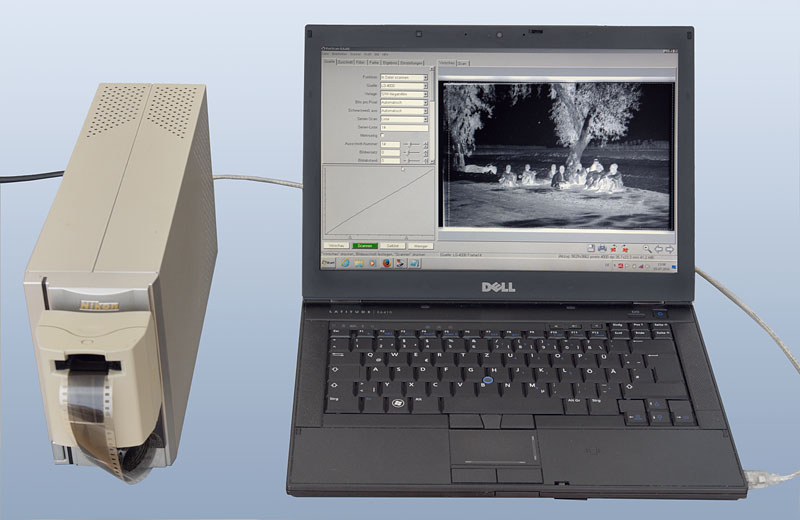
An older film scanner with FireWire? The Nikon Coolscan 4000 ED connected to a Dell Latitude E6410 still has the required port and performs the job just as efficiently as a modern PC.
Since there has been little progress in desktop film scanners after 2003, and many older models remain in use because there are no significantly better alternatives, virtually any good computer built since 2010 is more than capable of operating them. Computers are also being kept in service much longer today. Up until around 2010, computing performance increased dramatically every two years, and the improvements were immediately noticeable. Those days are largely over. Many second-hand computers remain excellent choices even five or more years after their original purchase, especially if their conventional hard drive is replaced with a fast SSD and the RAM is upgraded.
New computers sometimes lack important legacy interfaces such as SCSI or FireWire. In other cases, older scanning software no longer runs under current operating systems. However, that is no reason to dispose of an otherwise excellent scanner.
Older Operating Systems
If proven older software no longer runs under modern operating systems, there is nothing wrong with using Windows XP or Windows 7 on an older laptop or desktop PC purchased very inexpensively on the used market.Security concerns are largely unnecessary if such an older computer is used exclusively to control a scanner. It simply should not be connected to the Internet. Image viewers, file managers, the operating system, and scanning software all work perfectly well offline and require no updates. Files can easily be transferred to a newer computer with a USB flash drive for editing and further processing. In addition, antivirus software for older operating systems is still available, along with many practical recommendations for minimizing security risks.
This approach is often much easier than trying to force compatibility with Windows 10 or Windows 11, or retrofitting modern computers with obsolete hardware interfaces.
Business-class laptops from Dell (Precision and Latitude), IBM, and Lenovo are particularly recommended. Many lease-return systems enter the used market in excellent condition and are available at very attractive prices.
Using inexpensive PCMCIA adapter cards (starting at around US$10), older laptops equipped with PCMCIA slots can be upgraded with missing interfaces such as USB 3.0 or SCSI. Affordable PCI expansion cards are available for desktop computers as well. One advantage of laptops is their small footprint—they can simply be put away in a cabinet when not in use.
Displays
Displays are not included in the overview of the historical development of computer prices and hardware specifications. Beginning around 2005, conventional CRT monitors were gradually replaced by flat-panel TFT displays. In the office environment, 19-inch monitors remained the standard for many years before gradually giving way to larger models after about 2015. By 2022, flat 4K displays with a resolution of 3840 × 2160 pixels and screen sizes between 24 and 32 inches were available starting at around US$300. These monitors are much larger than older models while offering exceptionally high resolution. Even Full HD (1920 × 1080 pixels) is sufficient to display images with plenty of fine detail, so the difference between Full HD and 4K is often hardly noticeable in everyday office work. However, professionals working in photography, video production, and other visual media certainly appreciate the fourfold increase in pixel count on larger displays.Perspective
At present, there is little incentive to purchase a new computer. Most users are not concerned whether a CPU has four or eighteen cores because the applications they actually use run only marginally faster, and the differences in everyday use are usually too small to justify choosing the more powerful—and more expensive—option. Smartphones appear to have reached a similar stage. After years of rapid evolution, progress has slowed considerably. Manufacturers are experimenting with foldable displays in the hope of stimulating the market.Five terabytes appears to be the practical capacity limit for 2.5-inch hard drives with rotating platters. This limit has remained unchanged for several years. Is it because manufacturers can no longer increase capacity, or because they simply choose not to? Perhaps SSD manufacturers expect prices to continue falling rapidly and therefore no longer invest much effort in developing smaller conventional hard drives. That is certainly possible. On the other hand, the COVID-19 pandemic (2020–2022) may also have slowed technological progress in this area.